
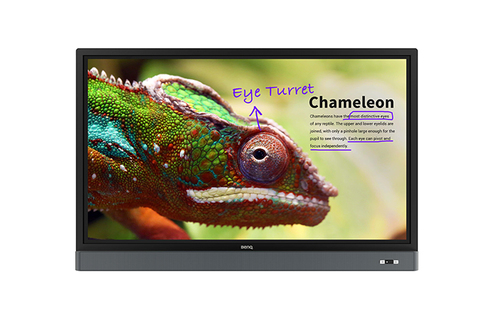
BenQ RM5501K interactive whiteboard 139.7 cm (55") 3840 x 2160 pixels Touchscreen Black, Grey
BenQ RM5501K, 139.7 cm (55"), 350 cd/m², 3840 x 2160 pixels, 4K Ultra HD, IPS, 1200:1
Availability:: Arriving soon
4K UHD 55” Education Interactive Flat Panel Display | RM5501KYour Caring Mate for Enhanced Interactive Learning The RM5501K is designed to tap into the dynamic possibilities of the classroom and help teachers build a healthy and engaging learning environment. Not only does the RM5501K come with the Eye-Care solution, but it is also installed with proficient annotation tools for enhanced class participation. RM5501K is your ultimate interactive display to achieve a touch-enhanced, smooth and fun learning experience.Ultra-Smooth Handwriting Enhances Collaborative LearningWith the continuous advancement of our touchscreen technology, RM5501K offers precise positioning to guarantee a streamlined and ultra-smooth handwriting experience that can effectively enhance class interaction and student participation.Dual Pens for Simultaneous Collaboration with Two Different ColorsRM5501K comes with dual pens that allow two users to write or draw with different colors simultaneously, making it ideal for lively classroom activities. Additionally, teachers can now create a more engaging learning experience by using two pens to write and highlight with two different colors, eliminating the need to change colors in a traditional classroom scenario. Flexible Display of Brush Mode for Creative EducationThe advanced touchscreen (IR touch) technology equips RM5501K with the capability of naturally displaying different stroke thickness based on different types of tools used to write or draw on the screen, offering educators and students a more natural writing experience. RM5501K is capable of detecting strokes created with fingers, the IFP stylus, watercolor brush or even pencil. This unique feature makes RM5501K ideal for drawing or artistic creation in art classes.Eye-Care SolutionTÜV-Certified Low Blue Light TechnologyBlue light emissions from displays may cause adverse health effects such as macular degeneration or disrupted melatonin secretion. BenQ’s Low Blue Light technology minimizes blue light exposure and allows for healthier time spent in front of the display, helping you create the best and most comfortable viewing experience for you and your students.TÜV-Certified Flicker-Free TechnologyFlickering, which is the main cause for eye strain and visual fatigue, is the result of rapid change of bright backlight, a common phenomenon in most displays using Pulse Width Modulation (PWM) that turns the backlight on and off quickly in order to control the display’s level of backlight brightness. BenQ’s Flicker-Free technology is meticulously designed to remove LED backlight flickering while providing a zero-flicker viewing experience. This effectively reduces CVS-related eye problems and alleviates discomfort caused by looking at the screen all day.Anti-Glare DisplayScreen glare can cause reflected images on the screen, making it challenging for students to see, take notes, and remain focused. The RM5501K’s anti-glare glass surface can effectively reduce reflections, freeing students from excessive squinting with more legible text and clearer images, avoiding eye strain and facilitating more effective instruction.Foster Active Learning & Collaborative InteractionEZWrite 4.1 Lite : An Easy and Fun Annotation SolutionIntelligent Handwriting Recognition The RM5501K’s handwriting recognition feature allows presenters to simultaneously convert written text, numbers, forms, and drawings into legible materials without having to switch modes while effectively facilitating smooth teaching flow.Floating Tool EZWrite 4.1's floating toolbar is compatible with any input source and Android applications. The floating on-screen menu lets you immediately access a range of functions, including screen capture, eraser, pen and whiteboard by placing two fingers on the screen. It helps increase learning efficiency in the classroom.Access Diverse Files on the FlyEZWrite 4.1 Lite directly opens a wide range of files, and image files for convenient annotations in productive meetings without the need for external PCs.Data-to-GoSave annotations as .pdf or .png files and share them as review materials through QR code, print, USB drive, or IFP's internal memory.Tool BoxTool Box is the all-in-one place that offers a wide range of useful teaching tools, including calculator, geometry, and team post to facilitate truly interactive lectures.Wireless Solution for Seamless CollaborationInstaQShare is the software designed for seamless wireless presentation and collaboration during lectures. It allows the smooth streaming of visual, audio files and Full HD quality videos. Users can also mirror content from mobile devices, and invite up to 16 participants for seamless collaboration.Facilitate Teaching Flow with Friendly DesignFront-facing Speakers and External Microphone Compatibility for More Impactful LearningRM5501K repositions the 20W audio speakers to the front, offering better sound transmission that elevates the level of audiovisual enjoyment during classes. Additionally, RM5501K comes with a Mic-In port that allows teachers to connect external microphones, further facilitating an impactful and effective learning experience for students. Freeze and BlankBlank to darken the screen so students can remain focused on teachers' instructions.Freeze to pause the screen so teachers can capture certain segments from videos or highlight on the screen (through the remote control or hotkey)Instant Plug and PlayRM5501K can save you from the hassles of complicated setup. Simply connect to a PC via USB and you’re all set to deliver compelling IFP touch-enhanced lessons.Maximize Flexibility in Teaching through Open SharingMultiple Display Application for Increased Teaching Efficiency RM5501K supports dual display application through HDMI out, allowing teachers to share teaching materials to more than one screen and increase the efficiency of teaching and student engagement.Multi-Platform CompatibilityThe Interactive Flat Panels can work seamlessly with a wide range of computing and mobile devices running most major operating systems, from Windows to Mac, Linux and Chrome, through its plug-and-play feature.Recommended Apps through “BenQ Suggest” RM5501K incorporates several recommended Android apps into BenQ Suggest, which further expand the IFPs' potential by simplifying app updates and downloading in the future.Hassle-free Display Management Made PossibleMDA (Multiple Display Administrator)Operators can remotely control display on/off time or backlight via LAN or RS232. DMS 1.0 (Display Management System)Install Android™ apps for a selection of displays through BenQ’s cloud server.OTA (Over-the-Air) UpdateKeep all display drivers up-to-date with easy firmware update.
| Display | |
|---|---|
| Display diagonal | 55 " |
| Display brightness | 350 cd/m² |
| Display resolution | 3840 x 2160 pixels |
| HD type | 4K Ultra HD |
| Panel type | IPS |
| Contrast ratio (typical) | 1200:1 |
| Response time | 8 ms |
| Touchscreen | Y |
| Number of simultaneous touchpoints | 20 |
| Viewing angle, horizontal | 178 ° |
| Viewing angle, vertical | 178 ° |
| Pixel pitch | 0.315 x 0.315 mm |
| Computer system | |
| Operating system installed | Android |
| Operating system version | 5.0.1 |
| Audio | |
| Built-in speaker(s) | Y |
| Built-in microphone | Y |
| Projector | |
| Aspect ratio | 16:9 |
| Ports & interfaces | |
| HDMI ports quantity | 5 |
| Ethernet LAN (RJ-45) ports | 1 |
| VGA (D-Sub) ports quantity | 1 |
| Audio output | Y |
| RS-232 ports | 1 |
| Ergonomics | |
| Product colour | Black,Grey |
| Panel mounting interface | 300 x 300 mm |
| Wall mountable | Y |
| Certification | CE |
| Power | |
| Power consumption (max) | 200 W |
| Power consumption (typical) | 124 W |
| Power consumption (standby) | 0.5 W |
| AC input voltage | 100 - 240 V |
| AC input frequency | 50 - 60 Hz |
| Energy efficiency class (old) | B |
| System requirements | |
| Windows operating systems supported | Y |
| Linux operating systems supported | Y |
| Mobile operating systems supported | Y |
| Operational conditions | |
| Operating temperature (T-T) | 0 - 40 °C |
| Operating relative humidity (H-H) | 20 - 80 % |
| Storage temperature (T-T) | -10 - 60 °C |
| Storage relative humidity (H-H) | 10 - 60 % |
| Packaging content | |
| Cables included | AC,USB,VGA |
| Remote control included | Y |
| Batteries included | Y |
| Quick start guide | Y |
| Stylus included | Y |


Follow Us
We make consolidating, marketing and tracking your social media website easy.
Sign Up To Newsletter
Join 60.000+ subscribers and get a new discount coupon on every Saturday.
Download App
7rtechnology App is now available on App Store & Google Play. Get it now.


Add a review
Your email address will not be published. Required fields are marked *