
Makey Makey Classic: An Invention Kit for Everyone
The Original Makey Makey Classic – Named one of Consumer Reports’ “Best Tech Toys of 2014,” Popular Science’s “Best of 2014 Toy Fair,” and a 2016 Toy of the Year finalist. Makes STEM education fun! Start simple with a banana piano. The initial setup only takes a few seconds. Then you can make game c
Availability: In stock
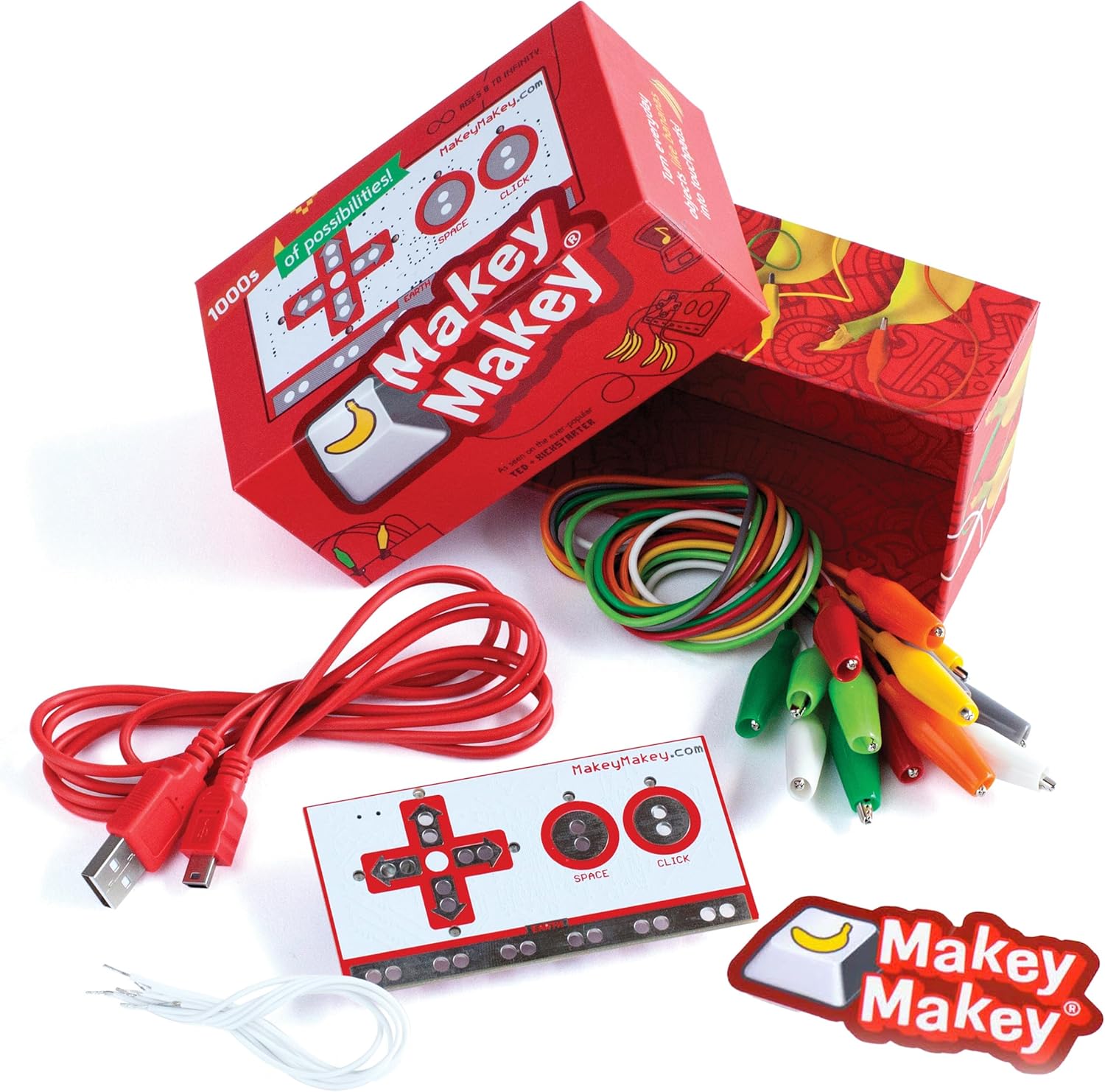
["The Original Makey Makey Classic – Named one of Consumer Reports’ “Best Tech Toys of 2014,” Popular Science’s “Best of 2014 Toy Fair,” and a 2016 Toy of the Year finalist. Makes STEM education fun! Start simple with a banana piano. The initial setup only takes a few seconds. Then you can make game controllers, musical instruments and countless inventions. Upgrade to additional inputs and remapping of up to 18 buttons. For children aged 8 and over and adults", "Turn everyday objects like bananas into touchpads!", "Connect the world around you to your computer! Setup only takes a few seconds", "Simply connect, attach and get started! No programming knowledge required. No software installation required. Works with Mac, Windows, Chromebook and Linux. If the device has a USB keyboard or", "Mouse supported, it should work with Makey Makey!", "Thousands of possibilities! Design your own game controller, secretly take a cat selfie and dance like never before", "For children from 8 years old to infinity. Contents", "Makey Makey board", "USB cable", "7 alligator clips", "6 connection cables", "Guide with visual project start guide", "Online documentation", "Makey Makey stickers"]
Specifications
| Feature 1 | The Original Makey Makey Classic – Named one of Consumer Reports’ “Best Tech Toys of 2014,” Popular Science’s “Best of 2014 Toy Fair,” and a 2016 Toy of the Year finalist. Makes STEM education fun! Start simple with a banana piano. D |
| Feature 2 | Turn everyday objects like bananas into touchpads! |
| Feature 3 | Connect the world around you to your computer! Setup only takes a few seconds |
| Feature 4 | Simply connect, attach and get started! No programming knowledge required. No software installation required. Works with Mac, Windows, Chromebook and Linux. If the device has a USB keyboard or |
| Feature 5 | Mouse supported, it should work with Makey Makey! |
| Feature 6 | Thousands of possibilities! Design your own game controller, secretly take a cat selfie and dance like never before |
| Feature 7 | For children from 8 years old to infinity. Contents |
| Feature 8 | Makey Makey-Board |
| Feature 9 | USB-Kabel |
| Feature 10 | 7 Krokodilklemmen |
| Feature 11 | 6 Verbindungskabel |
| Feature 12 | Guide with visual project start guide |
| Feature 13 | Online-Dokumentation |
| Feature 14 | Makey Makey-Aufkleber |
Follow Us
We make consolidating, marketing and tracking your social media website easy.
Sign Up To Newsletter
Join 60.000+ subscribers and get a new discount coupon on every Saturday.
Add a review
Your email address will not be published. Required fields are marked *